small useful git tricks

- 3 mins read

Here’s a couple of git aliases I use all the time. It gives you a quick and clear overview of your branches and commits. It can even watch for changes in realtime and show you any changes.
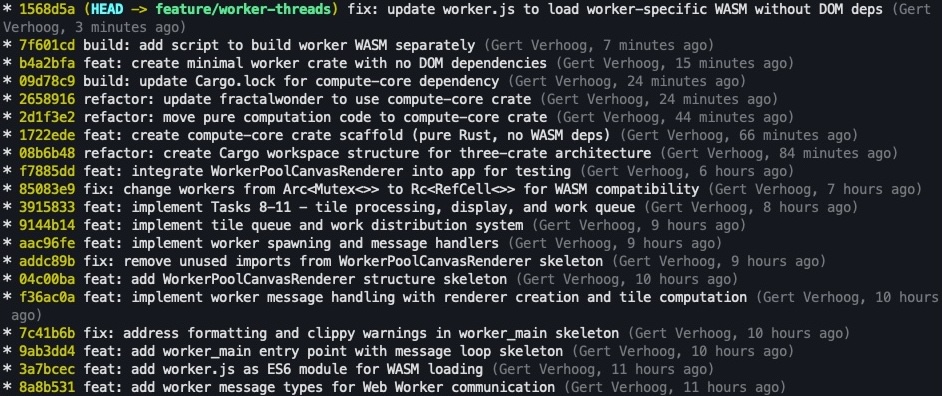
git log screenshot

A better git log

Add this to your .gitconfig:

1
2
[alias]
    tree = log --graph --decorate --all --format='%C(auto)%h%d %Creset%s %C(dim)(%an, %ad)%Creset' --date=relative

Run git tree and you get a compact view of your commit history with branches, colored hashes, commit messages, and authors. The --all flag shows all branches, not just the current one.

Live-updating git log

This one needs viddy, which is like watch but better. Install it with brew install viddy on Mac or go install github.com/sachaos/viddy@latest if you have Go.

1
2
[alias]
    watch-tree = !viddy -n 1 -d 'git -c color.ui=always tree | head -n $(tput lines)'

Run git watch-tree and you get a live view that updates every second. The head -n $(tput lines) part limits the output to your terminal height so it doesn’t scroll. The -c color.ui=always keeps the colors when piping through viddy.

I keep this running in a terminal while I work. When I commit or switch branches, the view updates automatically.

Update: now shows files modified/untracked

Just add this to your ~.gitconfig alias section:

1
    watch-tree = "!viddy -n 1 -d -t -w --disable_mouse --disable_auto_save \"git -c color.ui=always status --porcelain | awk 'BEGIN{u=\\\"\\033[1;31m\\\"; m=\\\"\\033[1;33m\\\"; s=\\\"\\033[1;32m\\\"; g=\\\"\\033[1;32m\\\"; r=\\\"\\033[0m\\\"; un=0; mod=0; st=0} {if(\\$0~/^\\?\\?/) un++; else if(\\$0~/^.M/) mod++; else if(\\$0~/^M./) st++} END{if(un==0 && mod==0 && st==0) printf \\\"  %sworking tree clean%s\\n\\\", g, r; else printf \\\"  %sUntracked:%d%s %sModified:%d%s %sStaged:%d%s\\n\\\", u, un, r, m, mod, r, s, st, r}' ; git -c color.ui=always tree | head -n $(tput lines)\""

What this does

The alias wraps two git commands in viddy, which re-runs them every second and highlights what changed:

1
viddy -n 1 -d -t -w --disable_mouse --disable_auto_save

First it runs git status --porcelain through an awk script that counts untracked, modified, and staged files:

 1
 2
 3
 4
 5
 6
 7
 8
 9
10
11
12
13
14
15
16
17
18
19
20
21
22
git -c color.ui=always status --porcelain | awk '
  BEGIN {
    u="\033[1;31m"    # red for untracked
    m="\033[1;33m"    # yellow for modified
    s="\033[1;32m"    # green for staged
    g="\033[1;32m"    # green for clean
    r="\033[0m"       # reset color
    un=0; mod=0; st=0
  }
  {
    if($0~/^\?\?/) un++              # count untracked files
    else if($0~/^.M/) mod++          # count modified files
    else if($0~/^M./) st++           # count staged files
  }
  END {
    if(un==0 && mod==0 && st==0)
      printf "  %sworking tree clean%s\n", g, r
    else
      printf "  %sUntracked:%d%s %sModified:%d%s %sStaged:%d%s\n",
             u, un, r, m, mod, r, s, st, r
  }
'

The porcelain format is just ?? for untracked, .M for modified, M. for staged. Count them up, print a summary.

Then it runs your tree alias and limits the output to your terminal height:

1
git -c color.ui=always tree | head -n $(tput lines)

The -c color.ui=always keeps colors when piping through viddy.